





Chevrolet Colorado: Apple CarPlay & Auto Guide
This content was aggregated from local dealer data and insights provided by the USA Today Network Automotive Insights team using Google Gemini and the Vehicles for Sale Near Detroit – Free Press Edition marketplace writing team.
Connecting Your Smartphone to the 2026 Chevrolet Colorado WT 4WD Infotainment System
The 2026 Chevrolet Colorado is engineered to keep you connected, no matter where your journey takes you. With its advanced infotainment system, seamlessly integrating your smartphone for navigation, communication, and entertainment is straightforward. This guide will walk you through connecting your device using Apple CarPlay and Android Auto, ensuring you get the most out of your Chevrolet Colorado experience.Key Highlights of the 2026 Chevrolet Colorado WT 4WD
- Robust 2.7L TurboMax Engine delivering 310 Horsepower
- Smooth 8-Speed Automatic Transmission with 4x4 Drive Type
- Wireless Apple CarPlay and wireless Android Auto smart device mirroring
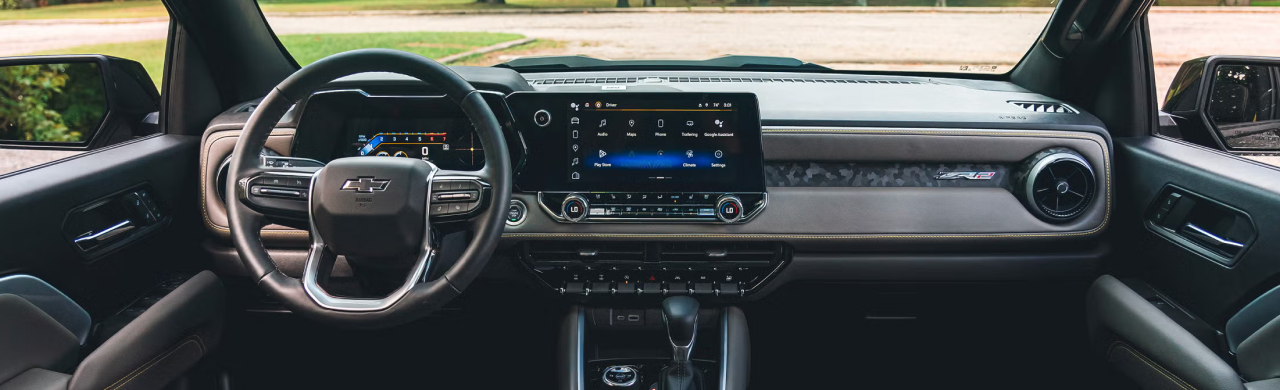
- Advanced 11.3-inch Diagonal Advanced Color LCD Display
- Comprehensive Chevy Safety Assist features, including Forward Collision Alert with Automatic Emergency Braking
- Comfortable Crew Cab body style with Jet Black interior
- Capable towing capacity of 3,500 pounds and a standard payload of 1,700 pounds
- Equipped with Wi-Fi hotspot-capable mobile hotspot internet access
Driving Performance and Capability
Powering the 2026 Chevrolet Colorado WT 4WD is a formidable 2.7 L, 4-cylinder TurboMax Engine that produces 310 Horsepower at 5,600 RPM. This engine is paired with a responsive 8-Speed Automatic Transmission, providing smooth shifts and reliable power delivery whether you are on the highway or navigating challenging terrain. With its 4x4 drive type, the Chevrolet Colorado offers enhanced traction and control, making it a versatile companion for any adventure. It achieves an estimated 17 MPG in the city, 22 MPG on the highway, and a combined 19 MPG.Comfort and Technology Features
The interior of the 2026 Chevrolet Colorado WT 4WD is designed for comfort and connectivity. The Jet Black interior features Cloth/evotex Seat Trim and front bucket seats with manual adjusters for both the driver and front passenger. At the heart of the cabin is the impressive 11.3-inch Diagonal Advanced Color LCD Display, which serves as your command center for entertainment and vehicle settings. Steering Wheel Mounted Audio Controls provide convenient access to the 6-Speaker Audio System Feature, and a SiriusXM Trial Subscription is available for a wide range of audio content. The vehicle also comes with a Wi-Fi Hotspot capable of mobile hotspot internet access, keeping you connected on the go.Connecting Your Smartphone: Apple CarPlay and Android Auto
The 2026 Chevrolet Colorado WT 4WD supports wireless Apple CarPlay and wireless Android Auto, allowing you to integrate your smartphone without the need for cables. Apple CarPlay is designed for Apple iPhone users (iOS operating system), bringing your phone's apps like Maps, Messages, and Music directly to the infotainment screen. Android Auto is for Android smartphone users, offering similar functionality for navigation, communication, and media.Wireless Connection Steps:
- Ensure your phone's Bluetooth is enabled and discoverable.
- On the Chevrolet Colorado infotainment screen, go to the "Phone" or "Projections" menu.
- Select "Add Phone" or "Pair New Device."
- Your phone should appear on the vehicle's screen. Select your phone.
- Confirm the pairing code displayed on both your phone and the infotainment screen.
- Once paired via Bluetooth, the system will prompt you to enable Apple CarPlay or Android Auto. Accept the prompt on both your phone and the vehicle screen.
Wired Connection (if preferred or for older devices):
While the 2026 Chevrolet Colorado WT 4WD offers wireless connectivity, you can also use a USB cable. Connect your smartphone to a USB data port in the vehicle. The infotainment system should automatically detect your device and prompt you to launch Apple CarPlay or Android Auto.Safety and Reliability
Safety is a priority in the 2026 Chevrolet Colorado. This vehicle is equipped with Chevy Safety Assist, a suite of advanced safety features designed to help you drive with confidence. Key features include Forward Collision Alert with Automatic Emergency Braking, which can help prevent or reduce the severity of front-end collisions. Front Pedestrian and Bicyclist Braking adds an extra layer of protection for vulnerable road users. Lane Keep Assist with Lane Departure Warning helps you stay in your lane, while Following Distance Indicator assists in maintaining a safe distance from the vehicle ahead. IntelliBeam Automatic High Beam On/off automatically adjusts your headlights for optimal visibility without dazzling oncoming drivers.Quick Specifications Summary
- Make: Chevrolet
- Model: Colorado
- Year: 2026
- Trim: WT 4WD
- Engine: 2.7 L, 4-cylinder TurboMax Engine
- Horsepower: 310 HP @ 5600 RPM
- Transmission: 8-Speed Automatic
- Drive Type: 4x4
- City MPG: 17
- Highway MPG: 22
- Combined MPG: 19
- Towing Capacity: 3,500 lbs
- Standard Payload: 1,700 lbs
- Exterior Color: Black
- Interior Color: Jet Black
Frequently Asked Questions About Smartphone Connectivity
What do I need before pairing my phone with the Chevrolet Colorado Apple CarPlay?
Before pairing, ensure your iPhone is updated to the latest iOS version. Also, make sure Bluetooth is enabled on your phone and that you have a good-quality USB cable if you plan to use a wired connection. For wireless, just ensure Bluetooth is on and Wi-Fi is also active on your phone.How do I connect Android Auto to a Chevrolet Colorado?
To connect Android Auto, ensure your Android phone has the Android Auto app installed and is updated. Enable Bluetooth on your phone. On the Chevrolet Colorado infotainment screen, select "Phone" or "Projections," then "Add Phone." Once your phone appears and you confirm the pairing code, the system will prompt you to activate Android Auto. Accept the prompts on both your phone and the vehicle screen.What should I do if Apple CarPlay or Android Auto will not connect?
If you encounter connection issues:- Check your phone's Bluetooth and Wi-Fi settings to ensure they are enabled.
- Restart your phone and the vehicle's infotainment system (you can often do this by turning the vehicle off and opening the driver's door for a moment before restarting).
- If using a wired connection, try a different USB cable and ensure it's a data-transfer cable, not just a charging cable.
- Ensure there are no other devices currently connected to or trying to connect to the infotainment system. You may need to remove an existing phone from the vehicle's Bluetooth settings before connecting a new one.
- Check your phone's settings to ensure Apple CarPlay or Android Auto is enabled for your vehicle.
Why Buy From Michael Bates Chevrolet
At Michael Bates Chevrolet in Woodhaven, we are committed to providing a transparent and informative shopping experience. When you are looking for a Chevrolet Colorado for sale near Woodhaven, MI, our team is ready to help you compare the various configurations and technology options available. We focus on helping you understand the features of each model, like the advanced infotainment system and safety technologies in the 2026 Chevrolet Colorado WT 4WD. Our goal is to assist you in finding the perfect Chevrolet Colorado that fits your needs and preferences, ensuring you are well-informed about your vehicle's capabilities.Visit Michael Bates Chevrolet Today
Experience the impressive technology and capabilities of the 2026 Chevrolet Colorado WT 4WD for yourself. The 2026 Chevrolet Colorado is available now, ready for you to see and learn more about its features, including wireless Apple CarPlay and Android Auto. Contact Michael Bates Chevrolet in Woodhaven, MI, at (734) 365-6790 to speak with our knowledgeable team or to inquire about the 2026 Chevy Colorado for sale. We look forward to assisting you.Written for Michael Bates Chevrolet
By the USA TODAY Network Automotive Insights Team, in collaboration with https://vehiclesforsaleneardetroit.com/ and the Vehicles for Sale Near Detroit – Free Press Edition.
Disclaimer: The content provided in this article is intended for informational purposes only. Vehicle images may not depict the exact model, trim, features, packages, accessories, or specifications described. Vehicle pricing, availability, features, and specifications are subject to change without notice. Please consult the dealership directly for complete and accurate vehicle information.